
वर्णन
A complete security plugin that’s actually free. No “pro” version, no nag screens, no made-up threat statistics.
Login Protection
- Blocks IPs after failed login attempts
- Custom login URL (hides wp-login.php)
- Hides wp-admin from logged-out users
- Honeypot field for bots
- Hides login errors (stops username enumeration)
- Email alerts for admin logins from new IPs
- Country/IP restrictions on login page
IP Control
- Whitelist and blacklist
- Auto-blacklist after repeated lockouts
- IPv4, IPv6, CIDR supported
Geo Blocking
- Block countries
- Uses free IP2Location LITE database
- One-click download
Hardening
- Disable XML-RPC
- Disable dashboard file editing
- Disable application passwords
- Restrict REST API to logged-in users
- Remove WordPress version
- Block user enumeration (?author=1 and REST API)
- Disable pingbacks/trackbacks
Security Headers
X-Content-Type-Options, X-Frame-Options, X-XSS-Protection, Referrer-Policy, Permissions-Policy, Content-Security-Policy, HSTS
Two-Factor Authentication
- TOTP (Google Authenticator, Authy, etc.)
- Backup codes
- Enforce for admins
File Integrity Monitoring
- Checks WordPress core files against official checksums
- Daily scans
- Email alerts on changes
Malware Scanner
- Scans plugins, themes, uploads
- Pattern-based detection
- Quarantine suspicious files
- Weekly scans
Activity Log
- Login attempts, lockouts, blocks
- IP, country, username, timestamp
- Configurable retention
- CSV export
Tools
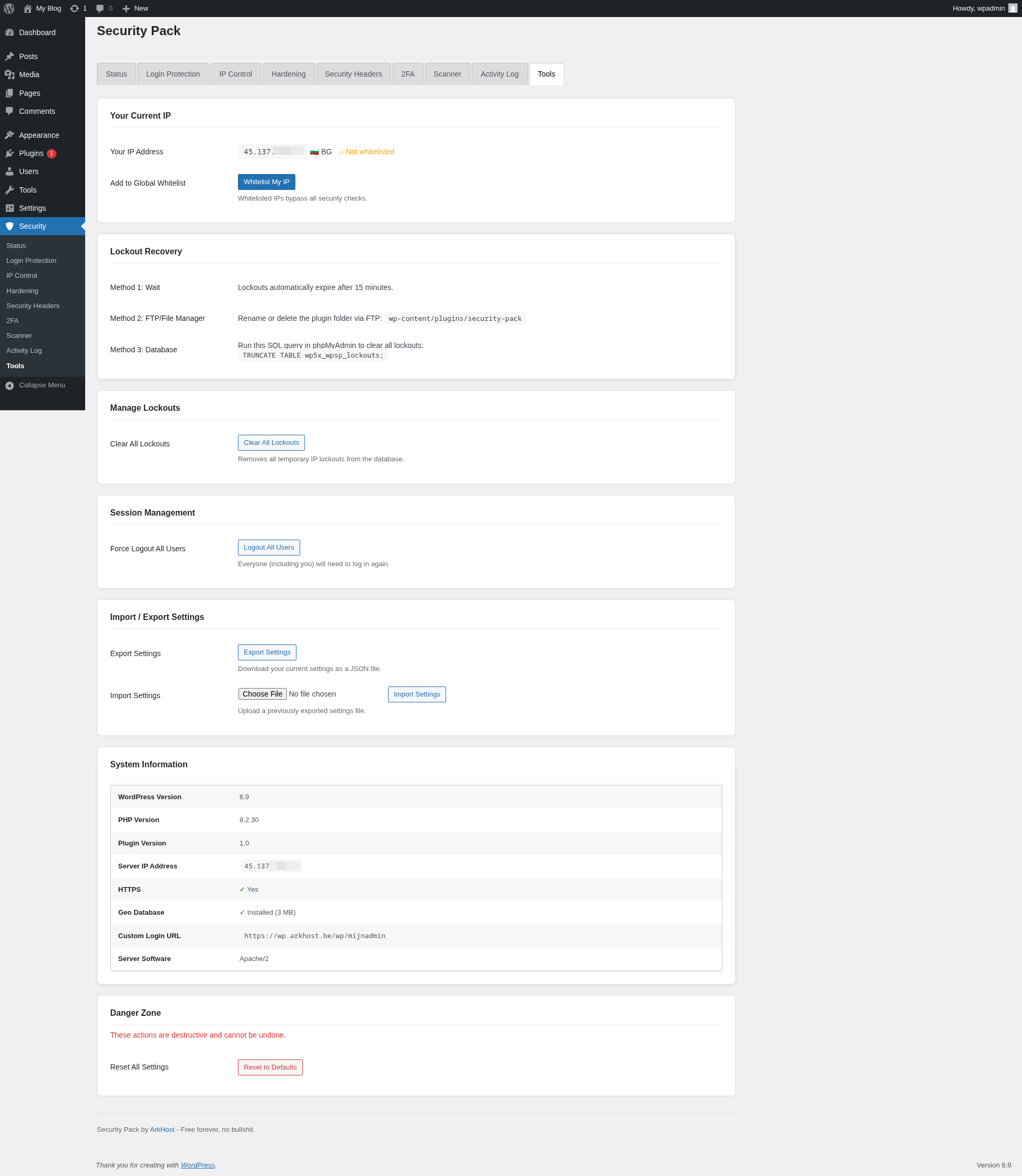
- Export/import settings
- Force logout all users
- Test email
- Delete readme.html/license.txt
Privacy
No tracking. No analytics. No telemetry.
External connections:
* WordPress.org API (core file checksums)
* IP2Location (database download, only when you click it)
External services
This plugin connects to the following external services under specific circumstances:
WordPress.org Checksums API
- Service: api.wordpress.org/core/checksums/1.0/
- Used for: Verifying WordPress core file integrity by comparing local files against official checksums
- Data sent: WordPress version and locale
- When: During daily scheduled file integrity scans and when manually triggered by the admin
- Privacy policy: https://wordpress.org/about/privacy/
IP Detection Services
- Services: api.ipify.org, ifconfig.me, icanhazip.com
- Used for: Detecting the server’s public IP address for the “Whitelist My IP” tool
- Data sent: Standard HTTP request (no personal data)
- When: Only when an admin uses the “Whitelist My IP” feature in the Tools tab
- Terms: https://www.ipify.org/ / https://ifconfig.me/ / https://icanhazip.com/
IP2Location
- Service: download.ip2location.com
- Used for: Downloading the free IP2Location LITE geolocation database for country-based blocking
- Data sent: Standard HTTP request (optional: user’s download token if configured)
- When: Only when an admin clicks “Download IP2Location Database” in the IP Control tab
- Terms of service: https://www.ip2location.com/terms
- Privacy policy: https://www.ip2location.com/privacy
स्क्रीनशॉट

Security status overview 
Login protection settings 
Activity log 
Two-factor authentication setup 
Malware scanner with quarantine 


स्थापना
- Upload the plugin files to
/wp-content/plugins/arkhost-security-pack/ - Activate the plugin through the ‘Plugins’ screen
- Configure under the Security menu
नेहमी विचारले जाणारे प्रश्न
-
No. This is the complete plugin.
-
Will it slow my site?
-
No. Checks run on login and admin access, not frontend page loads.
-
I locked myself out
-
Connect via FTP/SSH and rename the plugin folder. Log in normally. Fix your settings.
-
Does geo-blocking work without the database?
-
No. Download the free IP2Location LITE database from the plugin settings.
-
Can I use this with other security plugins?
-
Possible but likely to cause conflicts. We recommend using one security plugin at a time.
समीक्षा
ह्या प्लगइनसाठी कोणतेही समीक्षण नाही.
योगदानकर्ते आणि विकसक
“ArkHost Security Pack” हे मुक्त स्रोत सॉफ्टवेअर आहे. पुढील लोक या प्लगइनच्या निर्मितीत योगदान केले आहे.
योगदानकर्ते
भाषांतर करा “ArkHost Security Pack” तुमच्या भाषेत.
विकासातील आग्रह?
कोड ब्राउझ करा, SVN संग्रहालय तपासा, किंवा विकास लॉग च्या RSS द्वारे सदस्यता घ्या.
बदलांची यादी
1.1
- Fixed: Custom login URL form submission redirecting to 404 page
- Fixed: URL rewrite filters not being registered before login page render
1.0
- Initial release