
वर्णन
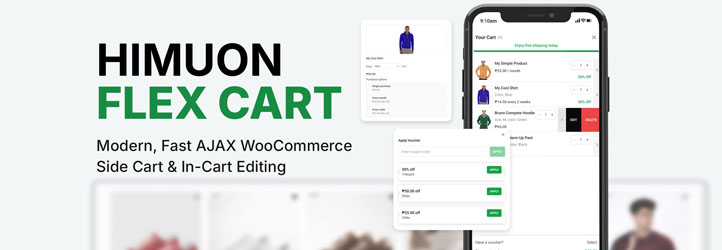
Himuon Flex Cart replaces the default mini-cart flow with a slide-out WooCommerce side cart designed to reduce friction and keep shoppers moving to checkout.
📘 Hooks And Filters: Github
🎥 Website Demo: Himuon Fashion
Shoppers can update quantities, remove items, edit variation selections, apply/remove coupons, and review savings without leaving the current page.
The plugin is built with WooCommerce fragment refreshes and extensibility in mind.
Key Features
- AJAX side cart with live WooCommerce fragment updates
- Quantity update and cart item removal inside the drawer
- Variation edit panel for variable products
- Subscription edit support for WooCommerce All Products for Subscriptions
- Coupon apply/remove workflow with optional coupon list
- Footer discount and subtotal display with applied coupon rows
- Free shipping progress section
- Mobile-friendly drawer behavior
- Theme and behavior customization through WordPress hooks and filters
- Template-based architecture for maintainable overrides/extensions
Developer Customization
This plugin is intentionally developer-oriented.
There is no admin settings page for UI/behavior customization.
Use hooks, filters, and template-level customizations to adapt output and behavior.
More hooks, filters, and code examples are available through the plugin source and template files.
Credits
Plugin assets (banners, icons, and screenshots) were designed by DesignsByLeby.
स्थापना
- Upload the
himuon-flex-cartfolder to/wp-content/plugins/. - Activate Himuon Flex Cart in WordPress admin.
- Ensure WooCommerce is active.
- Visit your storefront and add an item to cart to verify side-cart behavior.
नेहमी विचारले जाणारे प्रश्न
-
Does this plugin have an admin settings page?
-
No. The plugin is currently configured for hook/filter and template-based customization.
-
Does it support subscriptions?
-
Yes, for WooCommerce All Products for Subscriptions integration points used by this plugin.
-
Can I disable coupon list rendering?
-
Yes, via filter:
add_filter( 'himuon_flex_cart_enable_coupon_list', '__return_false' ); -
Can I disable or customize the free shipping progress amount?
-
Yes. Use
himuon_flex_cart_free_shipping_threshold.Disable free shipping progress:
add_filter( 'himuon_flex_cart_free_shipping_threshold', function () { return 0; } );Set a custom minimum (example: 75):
add_filter( 'himuon_flex_cart_free_shipping_threshold', function () { return 75; } ); -
How do I change the cart title text?
-
Use the
himuon_flex_cart_header_textfilter:add_filter( 'himuon_flex_cart_header_text', function () { return __( 'My Cart', 'your-text-domain' ); } ); -
Yes. Add the
himuon-side-cart-handlerclass to any element:<button type="button" class="himuon-side-cart-handler">Open Cart</button> -
Can I hide the floating mini cart trigger?
-
Yes. Use this filter:
add_filter( 'himuon_flex_cart_show_mini_cart', '__return_false' );
समीक्षा
ह्या प्लगइनसाठी कोणतेही समीक्षण नाही.
योगदानकर्ते आणि विकसक
“Himuon Flex Cart” हे मुक्त स्रोत सॉफ्टवेअर आहे. पुढील लोक या प्लगइनच्या निर्मितीत योगदान केले आहे.
योगदानकर्ते
भाषांतर करा “Himuon Flex Cart” तुमच्या भाषेत.
विकासातील आग्रह?
कोड ब्राउझ करा, SVN संग्रहालय तपासा, किंवा विकास लॉग च्या RSS द्वारे सदस्यता घ्या.
बदलांची यादी
1.0.0
- Initial public release
- AJAX side cart core interactions
- Variation/subscription in-cart editing
- Coupon apply/remove support
- Coupon list endpoint and loading UI
- Developer hooks and filter-based extensibility