

वर्णन
The fastest and only feature-complete SEO plugin that follows the guidelines and rules imposed by WordPress and search engines.
Preview The SEO Framework in WordPress Playground.
Start using proven SEO tactics to improve your website’s ranking. Clean, dedicated, extensible, unrestricted, ad-free, and no strings attached.
To top it off, this is the fastest full-featured SEO plugin, and it blends right into your WordPress website, without leaving you in the dark.
It’s easy to get started. Activate this plugin, and your site’s instantly protected against prominent SEO attacks. The SEO Framework will also prefill all critical meta tags for you. A real time-saver. Ingenious.
Migrate | Setup | Improve | Extensions | API | Support | Privacy
We poured over 30 000 hours of love into this plugin.
Here are the results:
-
It is brilliant.
The SEO Framework is an expert system for SEO. It is the only solution that can intelligently generate critical SEO meta tags in any language by reading your WordPress environment. This automation saves you a considerable amount of time that could be used to write more content or focus on other tasks. It also removes the need for advanced SEO knowledge. -
It comes preconfigured.
With The SEO Framework, we provide an excellent starting point for your website by rationally optimizing all your pages. Naturally, you can also tweak it however you like. If you’re not an SEO expert, learn what you may wish to optimize in our Setup guide. -
It helps you optimize your metadata.
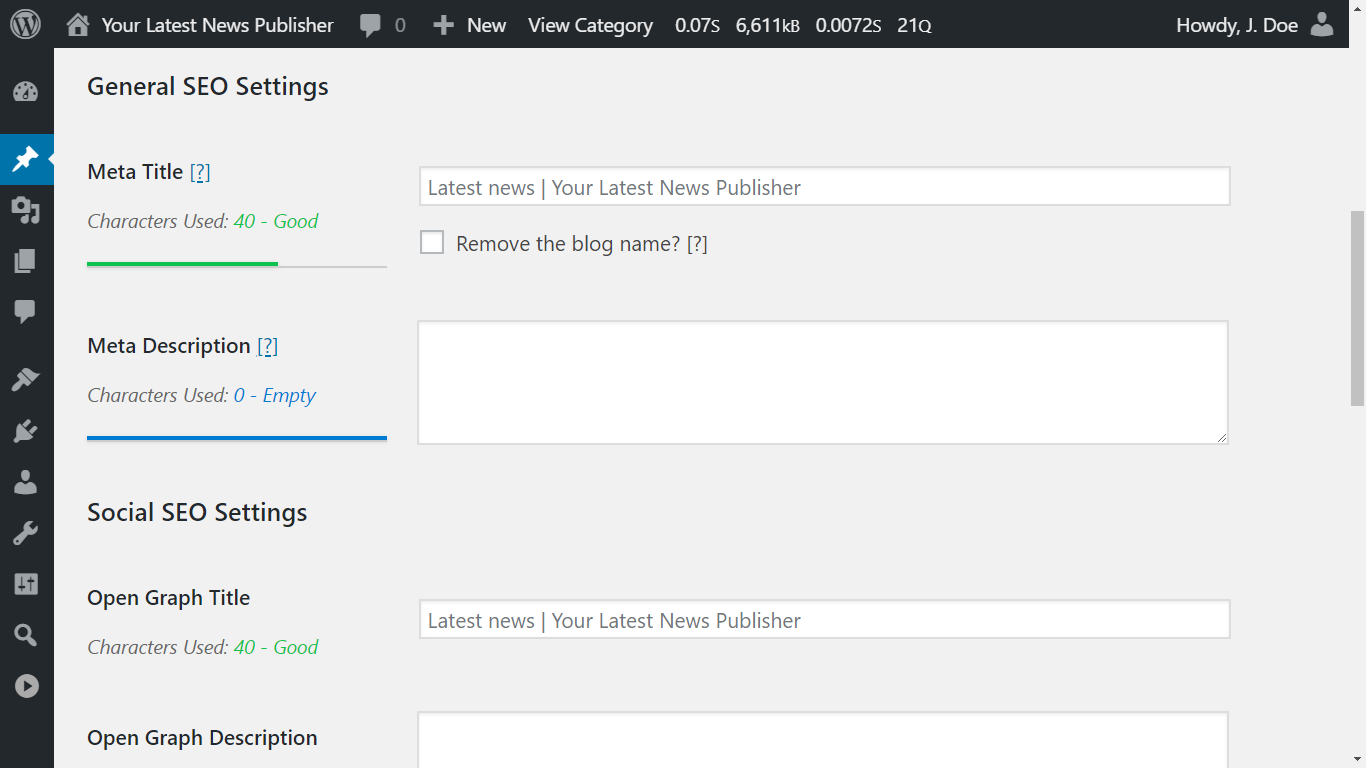
We made the only SEO plugin that follows Google’s webmaster guidelines to the letter. It took years of research and tweaking to translate this well inside your WordPress interface. Finally, you can freely optimize your pages without having to worry about making critical mistakes. -
It creates a beautiful overview.
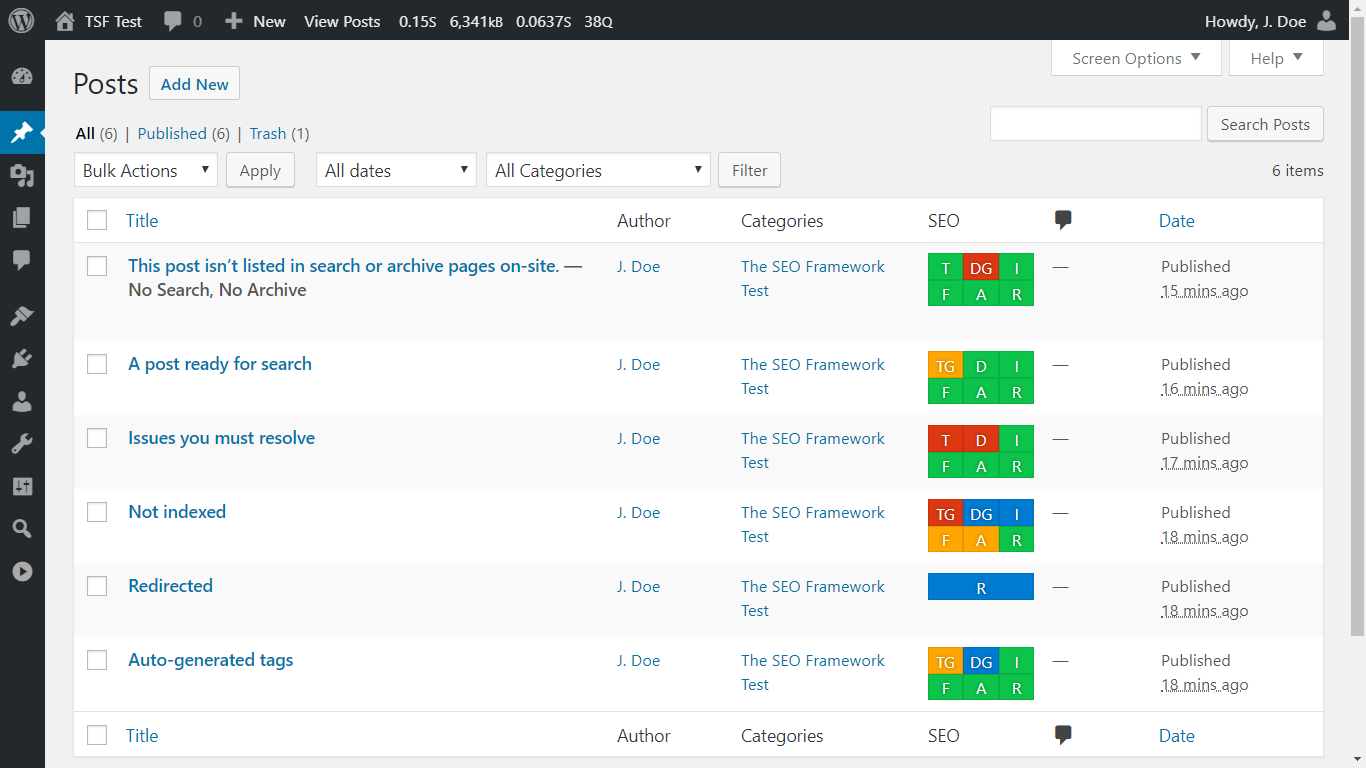
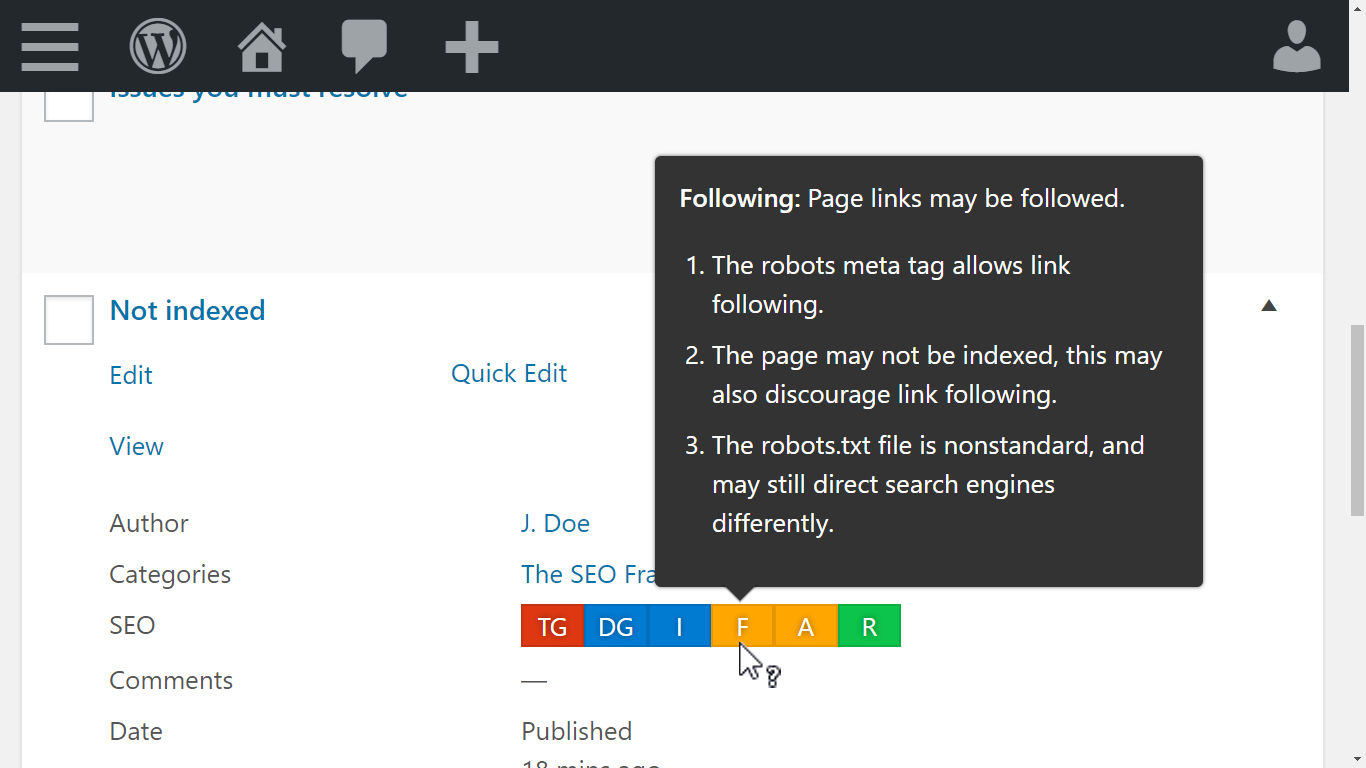
On your post, term, and user overview pages, you’ll find color-coded guidelines. They suggest how to improve your pages as you hover over them with your mouse cursor. For example, when your titles are unbranded or when WordPress blocks indexing. Instinctively, touch-and keyboard navigation is also supported. -
It includes exceptional support.
We don’t outsource our support. We’re here for you. Feel free to drop by our support channels at any time to ask a question. More than 5000 inquiries have been answered personally in the past nine years, typically within 72 hours. -
It leaves no room for errors.
We focus on the quality of features you need over the quantity on features you don’t. This trait makes this plugin unique, faster, more accurate, nearly bug-free, and more sustainable. The added benefit is that your site is unlikely to get penalized by search engines. We won’t steer you into writing unnatural content or allow you to trick search engines. -
It remains genuine and pure.
We built The SEO Framework for small to large corporations and enterprises. The interface is entirely accessible and seamlessly integrates within your dashboard. Therefore, interacting with this plugin feels natural. It might feel dull, but your WordPress dashboard shouldn’t be a billboard for our branding. We won’t ever change this. -
It improves search presence.
The SEO Framework ranks your website distinctively by enabling breadcrumbs for Google Search via structured data. It also automatically generates titles and descriptions according to Google’s guidelines and quickly helps search engines find the website’s latest changes via the built-in optimized sitemap. -
It makes social sharing easy.
The SEO Framework automatically supports and allows you to further tailor the Open Graph, Facebook, Twitter Cards, and Fediverse protocols. It helps your posts stand out when they’re shared on various social networks, including Pinterest, Discord, WhatsApp, and Mastodon. -
It feels more than accessible.
We handpicked our color scheme so that people with any medically recognized color-vision deficiency can distinguish the guidelines set by search engines. We also implemented full keyboard-navigation and screen-reader support. -
It protects you from mistakes.
The SEO Framework steers you from making significant and common SEO mistakes. It leaves little room for you to mess up because the plugin already does everything SEO for you. For example, it automatically prevents duplicated content mistakes by enforcing strict canonical rules. -
It follows best-practices and beyond.
The biggest problems with WordPress plugins are security and compatibility. As part-time security researchers, we focus on making this plugin impenetrable. The SEO Framework also uses WordPress’s API whenever possible, making this plugin integrate neatly with every other plugin written with that in mind. -
It has developers at heart.
We encourage other developers to enhance and add functionality to this plugin. We’ve done so ourselves, already, with our extensions. Check out our API, and feel free to contribute! -
It respects your privacy.
The SEO Framework sends us no information and does not create cookies. Learn more from our strictly adhered-to privacy policy.
Getting started
- Used another SEO plugin? Easily migrate your metadata.
- Need a helping hand getting started? Read our quick setup guide.
- Want to improve your pages? Learn how to optimize your metadata.
Do more with extensions
For additional functionality, check out our free companion plugin Extension Manager. It provides numerous free and paid extensions, such as:
- Focus guides you through the process of writing targeted content that ranks with focus keywords and synonyms.
- Articles enhances your published posts by automatically adding important Structured Data.
- Transport migrates and transforms metadata from Rank Math, Yoast SEO, and SEOPress to this plugin.
- Honeypot catches comment spammers through five lightweight yet powerful ways.
- Cord helps you connect your website to Google Analytics and Meta Pixel.
- Local lets you set up important local business information for search engines to consume.
- AMP binds The SEO Framework to the AMP plugin for AMP supported articles and pages.
- Monitor keeps track of your website’s SEO optimizations and statistics.
- Incognito hides all development-comments from The SEO Framework.
- Origin redirects attachment-page visitors back to the parent post.
- Title Fix makes sure your title output is as configured. Even if your theme is doing it wrong.
Visit our extensions overview page for more information.
Unbranded, free and for the professionals
The SEO Framework is a uniquely white label plugin that blends seamlessly into your WordPress dashboard. This means that we don’t even put the name “The SEO Framework” anywhere within your WordPress interface. No ads, no nags. Nobody has to know about the tools you’ve used to create your website. Note that we output standardized development-comments distinguishing the plugin output in source code. You can remove these with our free Incognito extension.
Behind the screens
The SEO Framework works on many things without notifying you, because the best software is fast, nimble, responsive, and should save you precious time. Here are a few things it does behind the screens.
- It prevents canonical errors for categories, pages, subdomains, and WordPress Multisite domain mapping.
- It stops SEO attacks that are caused by pagination exploits in WordPress by telling the search engine to look at the existing last page instead.
- It discourages 404 pages and empty categories from being indexed, even when they don’t send a 404 response.
- It discourages search engines from indexing feeds and the sitemap. This doesn’t mean they won’t use them; only, they won’t show them in their search results.
- It directs search engines from the comment pages back to the post storing those comments.
Compatibility and accessibility
The SEO Framework supports:
- Internationalization through WordPress.org. You can contribute here.
- Unicode (UTF-8) character recognition and rendering, including Emoji and CJKV (Chinese, Japanese, Korean, Vietnamese).
- Right to Left (RTL) languages (Arabic, Hebrew, Farsi, etc.), through its interface and meta tag generation.
- Complete color-vision deficiency accessibility thanks to a carefully picked color scheme.
- Full keyboard navigation, so that you can inspect tooltips quickly without ever having to reach for your mouse.
- Full screen-reader accessibility via field anchors, ARIA labels, and title attributes.
- WordPress Multisite setups, this plugin is in fact built upon one.
- Detection and output of robots.txt and sitemap.xml files.
- Full integration with WordPress Core sitemaps.
- SEO controls for posts, pages, custom post types, terms, post type archives, and author archives.
- Primary term (category) selection to influence breadcrumbs and links.
- Output of structured data via Schema.org JSON-LD scripts.
- Altering oEmbed for improved sharing on Discord.
- Detection of various other SEO plugins to help you switch graciously.
- Translation plugins like WPML, Polylang, TranslatePress, WPGlobus, and MultilingualPress.
- Page builders like Elementor and Bricks, including generated descriptions from Bricks Text and Section elements.
- E-commerce plugins like WooCommerce and Easy Digital Downloads.
- Blocking of SEO analysis and AI crawlers for Moz, OpenAI, Apple, and others, via robots.txt.
- Forum plugins like bbPress and wpForo.
- Editing posts and terms via WordPress’s native bulk-and-quick-edit interfaces.
- Headless mode via a single constant definition.
स्क्रीनशॉट

स्थापना
This plugin requires:
- PHP 7.4 or higher.
- WordPress 7.0 or higher.
- Any modern browser for administration.
Installation instructions:
- Install The SEO Framework either via your WordPress dashboard using plugin search or by uploading the files to your server.
- Either network-activate this plugin or activate it on a single site.
- That’s it! The plugin now handles your website’s SEO. It also protects your website against SEO attacks.
This plugin auto-configures its global settings
However, it would be best if you read up on our plugin setup guide to get the most out of The SEO Framework.
This plugin auto-configures SEO meta settings
Still, you may want to read up on our page improvement guide to learn how you can optimize your pages.
Get more SEO power
Optionally, also install our free Extension Manager plugin for additional SEO solutions.
नेहमी विचारले जाणारे प्रश्न
-
Is The SEO Framework free?
-
Absolutely! It will stay free as well, without ads, tracking, bloat, or nags!
This plugin is slim yet all-inclusive. It’s 100% freeware, not crippleware. -
No. We treat this plugin as premium already.
However, we do offer many free and paid extensions that help support this free plugin. We provide these via our free Extension Manager plugin.
-
Why is there no analytics, tracking, or 404 monitoring?
-
SEO experts that use advanced tools such as Ahrefs, SEMrush, Screaming Frog, and Google Analytics prefer using The SEO Framework because it doesn’t try to do their job haphazardly.
To correctly analyze your website, it must be done from the outside. If we load these features on your site, bad robots will cause thousands of false positives that fill your database with useless information that doesn’t apply to search engines. We refrain from this because it won’t ever help you anyway.
-
I have a feature request, a question, or found a bug.
-
Please visit the support forums and kindly tell us about it.
We’ll try to get back to you within a week. Typically, we reply within three days.
-
I am a developer; how can I help?
-
Any input is much appreciated, and everything will be considered.
Please visit the GitHub project page to submit issues or even pull requests.Learn more about contributing.
-
What do the colors tell me?
-
We use different colors to convey messages. Red is an error that you must resolve. Yellow is a non-critical warning that you may want to address. Green is good. Blue is informational and situational. Gray is undefined or unprocessable.
-
The sitemap doesn’t contain categories, images, etc.
-
Not having every single page listed is not an issue. Search engines love crawling WordPress because its structure is consistent and well known.
If a visitor can’t find a page, then why would a search engine? Don’t rely on your sitemap, but on your content and website’s usability.
Check out our Extension Manager. It brings extensions, like Articles, that fill in the gaps via modern and more robust means.
-
The sitemap contains unwanted links.
-
The SEO Framework takes all publicly queryable posts, pages, and CPT and puts them in the sitemap.
If you don’t want a page in the sitemap, consider enabling the
noindexoption for it. This option will also remove the page from search engine result pages.If the link shouldn’t be in the sitemap because it’s meant for structural reasons, then inform the plugin or theme author that created them.
You should tell the author to check out the “publicandrewritepost type arguments.” The plugin or theme author should know what that means.In the meantime, you can disable SEO for the unwanted entries via the “General Settings” under “Exclusions.”
-
Why aren’t focus keywords included?
-
Google warns about the keyword stuffing approach implemented by some other SEO plugins. It forces users to write unnatural content, and it can have adverse effects on your site’s ranking.
Modern search engines use AI to understand the context of your articles. This means that as long as you write relevant content, you shouldn’t have to worry about keywords.
However, we implemented the same API Google uses to help you find appropriate synonyms and inflections for your keywords. This functionality is part of our premium suite of extensions.
-
What do the application/ld+json scripts do?
-
The JSON-LD scripts are search engine helpers that tell search engines how to connect and index the site. We do this via the Schema.org standard.
They can tell the search engine if your site contains an internal search engine, which social sites you’re connected to, and what page structure you’re using. This is also referred to as structured data.
-
The SEO Framework outputs hidden breadcrumbs for search engines to find via its Schema.org settings.
You can also output these breadcrumbs visually in your theme by using a shortcode.
समीक्षा


योगदानकर्ते आणि विकसक
“The SEO Framework – Fast, Automated, Effortless.” हे मुक्त स्रोत सॉफ्टवेअर आहे. पुढील लोक या प्लगइनच्या निर्मितीत योगदान केले आहे.
योगदानकर्ते
“The SEO Framework – Fast, Automated, Effortless.” 28 लोकॅलसमध्ये भाषांतरित केले आहे. अनुवादकांना त्यांच्या योगदानाबद्दल धन्यवाद.
भाषांतर करा “The SEO Framework – Fast, Automated, Effortless.” तुमच्या भाषेत.
विकासातील आग्रह?
कोड ब्राउझ करा, SVN संग्रहालय तपासा, किंवा विकास लॉग च्या RSS द्वारे सदस्यता घ्या.
बदलांची यादी
5.2.0 – Complete
Pray take care, Glaucon, that your daring ambition doesn’t lead to a fall! Don’t you see how risky it is to say or do what you don’t understand? – Xenophon
Release highlights
- Authors now have complete SEO controls: a meta title and description, social tags, a canonical URL, robots directives, and a redirect.
- You can now click a generated title or description and edit it directly, instead of retyping it from scratch.
- We added Fediverse support, so Mastodon can credit the author when someone shares your page.
- Breadcrumb settings now let you pick the taxonomy for each post type and omit the post type archive.
- The breadcrumb shortcode can now omit the Home crumb and collapse long trails with its new
maxattribute. - The optimized sitemap now has a CSS stylesheet, so it stays readable when browsers stop applying XSLT.
- TranslatePress sites now get a sitemap for each language, and Polylang and WPML now advertise working sitemap URLs in robots.txt.
- You can now add a TikTok profile in the Schema.org settings.
- You can now enter a Facebook domain verification code in the Webmaster settings.
- Pages built with Bricks now get a generated description from their text.
- We fixed many edge-case issues and corrected inaccurate or outdated PHP and JavaScript documentation throughout the plugin.
Complete
After the “Profound” v5.1 update, we’re proud to present TSF v5.2 “Complete.” Posts, pages, custom post types, terms, and post type archives each had their own SEO controls for years. Authors never did: they only got Facebook and X profile fields, and everything else came from your global settings.
That ends now. Every kind of content you edit in the WordPress dashboard now carries its own SEO settings: posts, pages, terms, and users. Every author archive can be tuned, indexed, redirected, and inspected like any other page. We named this update “Complete” because it closes the last gap in the way TSF handles your content.
We didn’t stop there. This update also brings a long-requested way to edit generated values, Mastodon support, and a sitemap that survives the end of XSLT.
SEO for every author
Each user’s profile page now has General, Social, and Visibility settings for their author archive, next to the existing Authorial Info fields:
- General: meta title and meta description fields, and a “Remove the site title?” checkbox.
- Social: Open Graph title and description fields, Twitter Card title, description, and card type fields, and a social image field.
- Authorial Info: Facebook, Fediverse (new), and X profile fields.
- Visibility: canonical URL, robots indexing, link following, archiving, and 301 redirect fields.
Those values apply to that author’s archive. On an author archive, twitter:creator and fediverse:creator use the author’s X handle and Fediverse profile when you’ve set them. We store these fields once per user, including on Multisite, the same way we already stored Authorial Info.
The WordPress users sitemap listens to these settings. An author you set to noindex or to redirect leaves the sitemap, and an author you set to index stays listed, even when you set all author archives to noindex. The sitemap still lists only authors who have published posts. It also returns a 404 error when no author is indexable.
The SEO Bar comes along. The users list now shows it, and profile pages show it, too. A user who can’t edit posts isn’t a public author, so the SEO Bar shows only the indexing item for them.
Edit generated values directly
TSF fills empty title and description fields with a blurred placeholder showing what it generates. Until now, you had to retype that text from scratch to change a word. Now, click the empty field and the placeholder stays, with your cursor where you clicked. Start typing and the text becomes normal text you can edit. Clear the field and the placeholder returns.
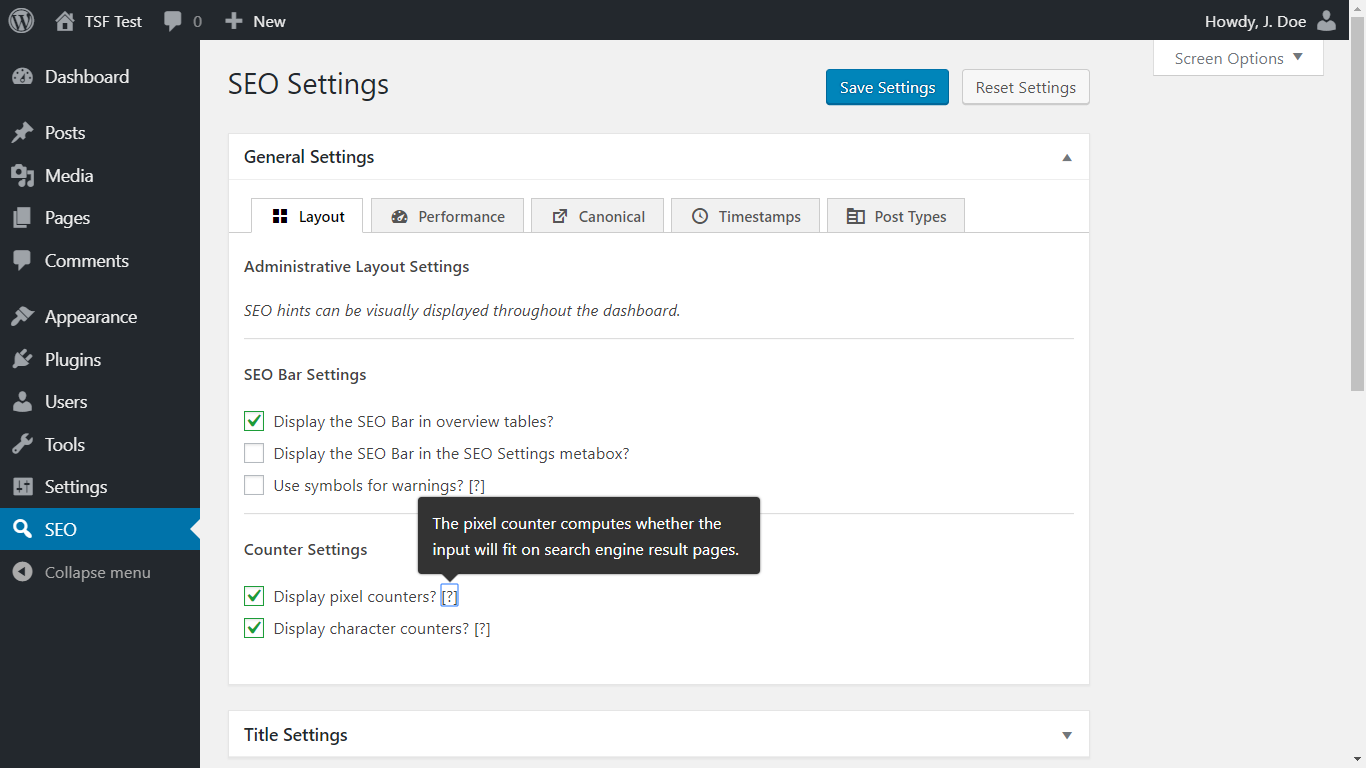
New sites have this enabled by default. Existing sites keep the previous behavior until you enable “Edit generated values directly?” at SEO Settings > General Settings > Layout, under Editing Settings.
Fediverse support
Mastodon can credit an author when someone shares your page, provided your page says who wrote it. We added the fediverse:creator meta tag and rel=me profile links for that, so Mastodon and other Fediverse platforms can credit and verify the profile.
You set a site profile and an author fallback at SEO Settings > Social Meta Settings, and each author can override that fallback on their own profile page. Each profile has a handle and a profile URL. Enter the @username@domain handle from Mastodon’s Author attribution, or paste a profile URL to fill both fields. TSF also adds the author’s Fediverse profile to the Schema.org sameAs links.
Our Fediverse creator and Mastodon article walks through setting up the credit and the green checkmark.
Breadcrumb settings
Two new settings at SEO Settings > Schema.org Settings change your breadcrumbs, and one cleanup applies automatically:
- Choose the taxonomy: singular breadcrumbs can use a chosen taxonomy for each post type. The default keeps the current trail, so products keep using Brands until you select Product categories. “Exclude taxonomy crumb” removes the term trail.
- Omit the archive: singular breadcrumbs can omit the post type archive. For products, that archive is the shop page.
- Cleaner names: breadcrumbs no longer prefix archive names, such as “Category:”, “Archives:”, or “Author:”. This affects structured data and the shortcode alike, and the trail skips parent pages that visitors can’t view.
Until you change the new settings, singular trails keep following the previous taxonomy and archive crumbs.
Breadcrumb shortcode
The breadcrumb shortcode changed, too:
- Shorter trails: the new
maxattribute collapses a longer trail. Amaxbelow 3 is treated as 3. - No Home crumb: the shortcode now omits the Home crumb when its
homeattribute is empty. - Whole crumbs: crumbs now wrap as a whole instead of breaking mid-word.
Read the breadcrumb shortcode article for the details.
A sitemap that survives XSLT
Major browsers will soon no longer apply XSLT by default. That means the styled, readable version of your optimized sitemap would turn into plain, unstyled XML. We ported the styling to CSS, so browsers that no longer apply XSLT still show a styled sitemap. As long as browsers still apply XSLT, the XSL view stays the preferred way to display it.
The CSS view has presentation and usability differences, but none of them affect the XML output. URLs aren’t clickable, the title and logo don’t link to the homepage, and the browser tab has no document title. Our sitemap styling article lists them all.
Sitemaps for every language
Multilingual sites got a lot of attention:
- TranslatePress: each published language that has a language directory now gets its own sitemap, and robots.txt lists every language except the one served without a directory.
- Polylang and WPML: robots.txt now advertises sitemap URLs that work. Before, the URLs could include the language directory twice, or the static front-page slug, so they returned a 404 error or redirected to WordPress’s sitemap.
- Cache clearing: clearing the sitemap cache now clears every language, including when your site uses a persistent object cache.
- Translated sitemap links: SEO Settings now lists the language sitemaps under “View translated sitemaps,” using the language name as the link text.
Our translation plugin compatibility article has the URL formats.
Facebook’s real language list
Facebook doesn’t document which languages it supports for Open Graph. So, we scraped their network and tested all 46500 possible locale combinations. TSF now drops 39 locales that Facebook doesn’t support, and adds three that it does: Haitian Creole, Inupiaq, and Inuktitut. For example, Spanish (Mexico) now falls back to Spanish (Spain). This affects only the Open Graph locale output, not your site’s language.
Even more
- TikTok: you can now add a TikTok profile at SEO Settings > Schema.org Settings. TSF includes it in your site’s Schema.org
sameAslinks. - Facebook verification: you can now enter a Facebook domain verification code at SEO Settings > Webmaster Meta Settings, under Webmaster Integration Settings. Thanks, Contributolo!
- Bricks: a page edited with Bricks now gets a generated description from the text in its Text and Section elements.
- Twitter Card labels: “Twitter Title” is now “Twitter Card Title,” and “Twitter Description” is now “Twitter Card Description.”
- Feeds: posts you exclude from on-site archive listings are now also omitted from the feed.
Edge cases, hunted down
We fixed many edge-case issues. For example, a backslash in a post or term SEO field no longer disappears on every save. Saving a post through the REST API or WP-CLI now refreshes the sitemap. A homepage title or description of 0 is no longer treated as empty. The detailed log linked below lists the rest.
We also corrected inaccurate or outdated PHP and JavaScript documentation throughout the plugin.
It has been a slow year for releases: over 10 months without an update. Behind the scenes, we spent months experimenting with and refining our development workflow. AI-assisted review helped us uncover issues, but Sybre personally verified every single letter written for this update.
We also built and published open-source tools:
- wp-plugin-regression runs WordPress Playground sites and compares plugin output before and after changes.
- makepot-tsf generates translation templates using WP-CLI’s internationalization tools, without requiring a WordPress installation.
We published the accompanying AI workflows for regression testing and translation template generation, too. Our expanded coding instructions guide AI assistants toward the conventions we use throughout TSF.
We can now build features we previously considered too costly to maintain. Bricks description generation and TranslatePress sitemap support are two results. There’s a lot more to come.
Clear your cache
We’ve updated the plugin’s CSS and JavaScript files. If you find issues with the interface, you may need to flush your browser caches. Check out our updated KB article to learn more.
If your cache plugin has no exclusion rules for sitemap endpoints, it could serve an empty sitemap or sitemap stylesheet on later visits. TSF now tells cache plugins that honor DONOTCACHEPAGE not to store those responses. That can’t remove an empty response your cache already stored, so run your cache plugin’s “Purge All,” “Clear all cache,” or equivalent action after updating.
Support the development
We hope you’ll love this update as much as we do. Please consider supporting us by posting a fantastic review, getting a license, or doing your friends and colleagues a favor by installing TSF for them.
If this update saved you time, you can also sponsor our work on GitHub. Sponsorship helps fund development without adding nags or upsells.
Detailed log
To hit on something right by luck without search I call good luck, to do something well after study and practice I call doing well; and those who pursue this seem to me to do well.
Full changelog
- You can find the full changelog here.